Wrist and Forearm Pain From Typing: RSI, Carpal Tunnel, and the Setup That Prevents Both
Aching wrists, burning forearms, fingers that tingle by Friday. What's actually injured, what's just angry, and the keyboard-and-protocol fix that works.
Undo The Desk is reader-supported. When you buy through links on this page we may earn an affiliate commission, at no extra cost to you. How we make money.
If your wrists ache by Thursday, your forearms burn after a heavy email day, or your ring and pinky fingers have started going faintly staticky during long sessions — your hands are filing the complaint, but the crime scene is usually your setup. This is the hub page: what’s actually going on in there, the red flags that mean “doctor, now,” and the fix in three layers — position, equipment, tissue.
One framing note up front: “RSI” isn’t a diagnosis, it’s a category — repetitive strain injury covers everything from tendon irritation to nerve compression. The fixes below help the whole category because they all reduce the same inputs: awkward joint angles held for hours, multiplied by thousands of small movements.
What typing actually does to a wrist
Put your hands on a standard flat keyboard and look at three angles your joints are holding:
- Extension. Your wrists cock upward 20–30 degrees to get fingers onto keys. Held extension narrows the carpal tunnel — the literal tunnel at the base of your palm through which nine tendons and the median nerve pass — and raises pressure inside it severalfold.
- Ulnar deviation. A standard keyboard is narrower than your shoulders, so your hands angle outward toward the pinkies to line up with the home row. The tendons that run along the thumb side get bent around the wrist’s corner all day.
- Pronation. Palms-flat is the forearm’s twisted position — radius crossed over ulna — held under static load for hours.
None of these angles is dangerous for a minute. All of them are corrosive for 2,000 hours a year, which is why the symptoms creep: ache first, then burning forearms (the finger-flexor muscles live there, and they’re doing all the work), then — in the unlucky — nerve symptoms.
Sort yourself before you fix anything:
- Aching wrists, burning or rope-like forearms, stiffness that warms up out: muscular-tendon irritation. This page is your fix, and the prognosis is excellent.
- Numbness or tingling in the thumb, index, and middle fingers — especially at night, especially shaking your hand “awake”: the carpal tunnel pattern (median nerve). The setup changes below reduce the pressure, but persistent or worsening night symptoms deserve a clinician — early carpal tunnel treatment is easy, late treatment is surgery.
- Tingling in the ring and pinky fingers, or pain at the elbow’s funny-bone side: the cubital tunnel pattern (ulnar nerve) — usually an elbow-position problem, often from planting elbows on hard armrests or desk edges. Pad the contact point, stop leaning on it, and watch it for two weeks.
- Sharp pain with a specific movement, swelling, or a recent fall: none of this page applies. Get it imaged.
Layer 1: Position (free, and bigger than the gear)
- Float or support, don’t plant. The cardinal sin is planting your wrists on the desk while typing — it locks extension into the worst angle under load. Palm rests are for resting between bursts, not during them. Your hands should hover, weight carried by the forearms on armrests or desk.
- Elbows at 90, close to your body. Keyboard close enough that you’re not reaching; reaching loads the whole chain from shoulder to fingers. (If your shoulders and neck are also complaining, that’s the same posture loop — the neck and shoulder guide is the upstairs floor of this fix.)
- Negative tilt beats positive. Those flip-out feet on the back of keyboards? They increase wrist extension. Keep them folded. If anything, the keyboard’s far edge should tilt slightly away from you.
- Lighten your touch. Most people type with 3–4× the force keys need, and grip the mouse like it owes them money. A conscious week of lighter inputs measurably reduces forearm workload.
- Break the hold every 30–45 minutes. Ten seconds: fists, then full finger spread, then slow wrist circles. Same interruption logic as every pattern on this site.
Layer 2: Equipment that changes the geometry
The position fixes cap the damage of a flat keyboard; an ergonomic board removes the bad geometry at the source. The full head-to-head — including who shouldn’t upgrade — is in our ergonomic keyboard guide. The short version, by symptom severity:
Mild, recent, or budget-capped: a gentle split-and-tent board you can type on the day it arrives. It fixes ulnar deviation and most of the pronation without a learning curve:
Logitech ERGO K860 Split Wireless Keyboard
The right ergonomic keyboard for the 95% of desk workers who want immediate wrist relief without learning a new typing system. If standing desks are a question of inches, this keyboard is a question of degrees — and the curve fixes the deviation problem on day one.
Pros
- + Curved split layout opens shoulders and removes ulnar deviation immediately
- + Built-in palm rest with memory foam — no separate accessory to buy
- + Logi Bolt + Bluetooth with seamless multi-device switching
- + Standard QWERTY layout — no relearning required
Cons
- – Halves are not separable — you can't widen the gap further
- – Not mechanical — feels like a typical Logitech membrane keyboard
- – Bulky footprint takes up most of a small desk
Real symptoms, willing to invest two weeks: a true split with adjustable tenting puts each half exactly under its shoulder and lets you dial the forearm twist down to nearly neutral. The adjustment period is real; so is the ceiling:
ZSA Moonlander Mark I
The split keyboard for the ergonomically curious — the modular tenting and column staggering are the two single biggest mechanical fixes for wrist strain. Worth the relearning if you're willing to commit two weeks.
Pros
- + Fully separable halves with built-in tenting up to 30°
- + Hot-swappable Cherry MX-style switches — change feel without re-soldering
- + Layered, columnar key matrix is more anatomical than staggered QWERTY
- + Web-based Oryx layout configurator is the best in the category
Cons
- – Columnar layout requires retraining — typing speed drops for the first week or two
- – Premium price tag
- – No integrated palm rest
The mouse matters as much. Standard mice hold the forearm in full pronation with a claw grip on top. A vertical mouse puts the hand in handshake position — neutral rotation — and is the single cheapest equipment win for forearm pain specifically. Pair whichever keyboard you choose with one; your mousing hand does more daily mileage than your typing hands.
Laptop users: the built-in keyboard forces every bad angle at once and parks your head a foot too low. External keyboard plus raised screen isn’t a luxury — it’s the whole fix. The screen-height half lives in the neck guide.
Layer 3: Tissue work (the part everyone skips)
The muscles that move your fingers live in your forearms, and after years of overwork they’re short, dense, and full of trigger points. Five minutes a day:
Flexor and extensor soft-tissue work — 2 minutes
Forearm flat on the desk, palm up: use your other elbow, a massage ball, or a percussion gun on a soft attachment to work slowly from wrist to elbow. Flip palm-down, repeat on the extensors. Light pressure — forearm tissue is thin and angry tissue rewards patience, not force. A small gun with a flat attachment is ideal here; this is light-tissue work, not glute demolition:
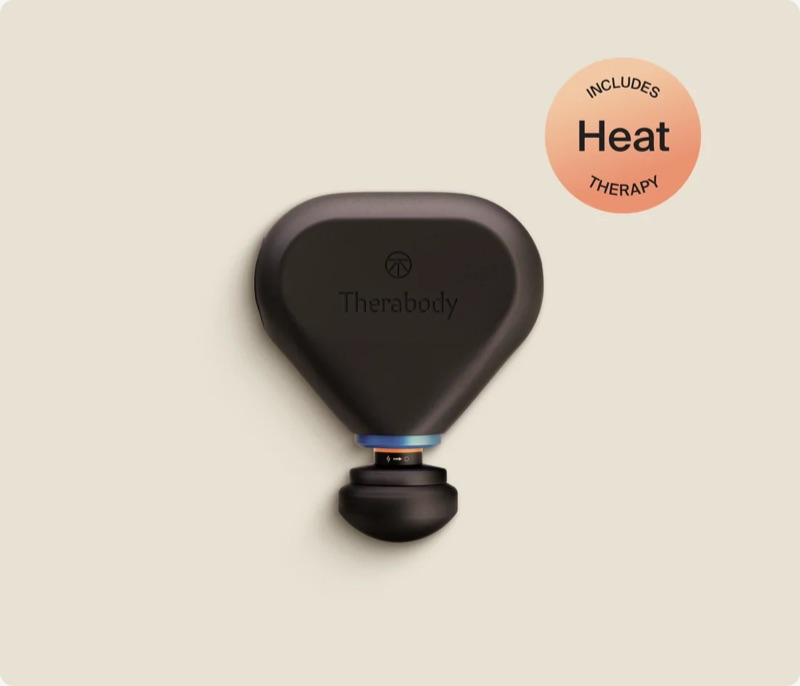
Theragun Mini Plus
The travel gun for desk workers who want heat with their percussion. The heat is the real upgrade — not depth — so if you only need portable percussion, the cheaper standard Mini is the smarter buy. Get the Plus if warming up tight tissue on the road matters to you.
Pros
- + Adds genuine heat (up to 131°F) to pre-warm tight tissue before percussion
- + Bluetooth + Therabody app with guided routines and pressure feedback
- + Still genuinely portable — fits a bag, USB-C, 120-minute battery
- + Triangle grip lets you reach your own glutes and hamstrings without contortions
Cons
- – 10mm amplitude is shallower than the standard $199 Mini's 12mm — less deep-tissue reach
- – 20 lb stall force bogs down on dense, year-old glute knots
- – $280 is a big jump over the standard Mini — you're paying for heat, not depth
- – Heavier than the standard Mini (~2 lb)
(Skip percussion directly over the carpal tunnel itself and the inside of the elbow — nerve real estate. Muscle belly only.)
Nerve glides — 1 minute, gentle
For the tingling patterns, once any acute flare settles: arm out to the side, palm up, gently extend the wrist while tilting your head away, then release both. Five slow reps per side, never into pain or symptom reproduction — glides should feel like a light floss, not a stretch.
Eccentric wrist work — 2 sets, 3×/week
Tendons rebuild under slow load. Light dumbbell or a soup can: wrist curls and reverse curls, three seconds down on every rep, 12–15 reps. This is the part that makes the fix permanent rather than a maintenance treadmill — the same load-what-you-lengthened logic as the posterior chain guide, one joint smaller.
What to expect
- Week 1: Position changes plus tissue work usually cut the end-of-day ache noticeably. Night tingling, if present, is slower — track it.
- Weeks 2–3: Forearm burning fades; a new keyboard’s adjustment hump (if you went split) is mostly over.
- Week 4+: Eccentric work compounding; flare-ups after heavy days become rare and brief.
- Not improving — or any progressing numbness, weakness, or dropped objects: clinician, without delay. Nerves are the one tissue on this site where “wait and see” has a real cost.
Frequently asked questions
How do I know if my wrist pain is carpal tunnel or just strain?
Location and timing tell most of the story. Carpal tunnel's signature is numbness or tingling in the thumb, index, and middle fingers — classically at night, often relieved by shaking the hand out. General strain shows up as aching wrists and burning forearms that warm up with movement and settle with rest. Tingling in the ring and pinky fingers points to the ulnar nerve at the elbow instead. Persistent night symptoms or any weakness deserve a clinician — early nerve treatment is simple, late treatment isn't.
Do wrist braces help with typing pain?
At night, yes — a neutral brace stops you sleeping with curled wrists, which is when carpal tunnel pressure peaks, and many people's night tingling improves within weeks. During the workday, braces are a crutch that weakens the case for fixing your actual setup; better to correct keyboard position and typing posture so your wrists don't need splinting to survive a Tuesday.
Are ergonomic keyboards actually worth it for wrist pain?
If your pain traces to the three angles a flat keyboard forces — extension, ulnar deviation, pronation — then yes, because a split or tented board removes the bad geometry at the source rather than managing its symptoms. A gentle curved split helps with zero learning curve; a true adjustable split helps more but costs two weeks of slower typing. If your pain is from mouse grip or elbow position, fix those first.
Why do my forearms burn when I type a lot?
Because the muscles that move your fingers live in your forearms, and a heavy typing day is thousands of contractions from muscles that are chronically short and dense from years of the same work. The burn is overworked flexor and extensor muscle, not nerve damage. Daily soft-tissue work along both sides of the forearm plus lighter typing force usually clears it within two to three weeks.
Can I keep working with RSI symptoms?
Usually yes, if you change the conditions — most tendon-irritation patterns settle while you keep working once the setup, typing force, and break rhythm improve, because the irritation is dose-dependent. What you can't do is keep the identical setup and hope the tissue out-toughs it. Progressive numbness, weakness, or dropping things are the exceptions: those mean reduce load now and get assessed.
Where this fits
Wrist and forearm pain is the bottom of the same kinetic chain that starts at your monitor — rounded shoulders and a forward head load the arms all the way down, which is why the neck and shoulder fix and this page work better together than apart. The equipment decision lives in the ergonomic keyboard guide. Fix the geometry, do the five minutes of tissue work, and let the tendons catch up — they always do, given honest inputs.